Tech
Typography Design Software: Best Tools for Creating and Editing Text Designs

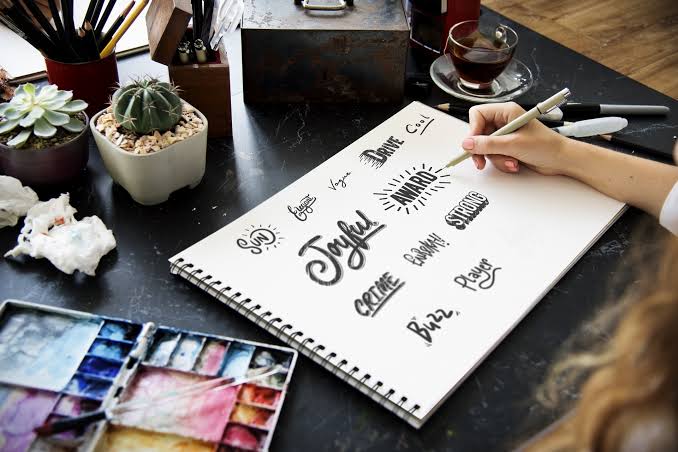
Typography design software is an important part of graphic design. The right font, spacing, size, and layout can make a design easier to read and more attractive. Typography design software gives designers the tools they need to create, edit, and organize text for different projects.
From website headings and logos to posters, advertisements, social media graphics, and printed materials, typography software can be useful for many types of design work.
In this guide, we will explain what typography design software is, what features to look for, and how these tools can help beginners, designers, businesses, and content creators.
What Is Typography Design Software?
Typography design software is a type of design program that provides tools for working with text and fonts.
These programs can help you control many parts of typography, including:
- Font selection
- Font size
- Letter spacing
- Line spacing
- Text alignment
- Text color
- Font weight
- Text positioning
- Text effects
- Text layouts
Some programs focus mainly on typography, while others are complete graphic design applications with advanced text tools.
The best software depends on what you want to create.
Why Is Typography Design Software Important?
Typography can change the entire appearance of a design.
A poorly chosen font can make a professional design look confusing. A good typeface with proper spacing and alignment can make the same content look much cleaner.
Typography software helps designers control these details instead of relying on basic text editing features.
It can be useful for:
- Logo design
- Website design
- Brand identity
- Posters
- Brochures
- Social media posts
- Advertisements
- Presentations
- Book covers
- Packaging
- Digital artwork
Features to Look For in Typography Software
Different programs offer different features. Before choosing typography design software, consider the tools you actually need.
Font Selection
A good typography program should make it easy to browse and use different fonts.
Some software also lets you organize fonts by family, weight, and style.
Letter Spacing
Letter spacing controls the space between individual characters.
Small changes can make a heading look more balanced and professional.
Line Spacing
Line spacing controls the distance between lines of text.
This is especially important when working with paragraphs, brochures, magazines, and website layouts.
Font Weight
Many font families include several weights, such as light, regular, medium, semibold, and bold.
Different weights can help create a clear visual hierarchy.
Text Alignment
Typography software normally provides options such as:
- Left alignment
- Center alignment
- Right alignment
- Justified alignment
Choosing the correct alignment can improve the overall layout.
Text Effects
Some design programs provide effects such as shadows, outlines, gradients, curves, and transformations.
These features can be useful for creative typography projects.
Types of Typography Design Software
Typography software can be divided into several categories.
Graphic Design Software
Graphic design programs usually include powerful typography features along with tools for images, shapes, illustrations, and layouts.
They are useful when typography is part of a larger design.
Font Design Software
Font design programs are used to create and edit actual font files.
Designers can create individual characters, adjust spacing, and build complete font families.
These programs are useful for people who want to create their own fonts.
Desktop Publishing Software
Desktop publishing programs are designed for documents with lots of text and structured layouts.
They can be useful for:
- Magazines
- Books
- Newspapers
- Brochures
- Reports
- Catalogs
Online Typography Tools
Online design tools run in a web browser and are often easier for beginners.
They can be useful when you need to create a quick social media graphic, banner, presentation, or text based design without installing software.
Typography Design Software for Beginners
Beginners do not always need advanced professional software.
A simple program with an easy interface can be a good starting point.
When choosing software as a beginner, look for:
- Simple controls
- Font previews
- Ready made templates
- Easy text editing
- Basic spacing controls
- Export options
- Browser based access if you do not want to install software
Learning basic typography principles is also important. Software gives you control, but good typography still depends on design choices.
Typography Software for Professional Designers
Professional designers often need more control.
Advanced software can provide detailed typography settings, vector editing, layout tools, font management, and support for professional file formats.
Professional designers may also need features such as:
- Advanced kerning
- OpenType controls
- Variable font support
- Vector text
- Character styles
- Paragraph styles
- Multiple artboards
- Print ready exports
- Precise layout controls
These features can make large design projects easier to manage.
Typography Design for Logos
Typography is frequently used in logo design.
Some brands use symbols and text together, while others rely almost entirely on typography.
When designing a typographic logo, pay attention to:
Font choice: Choose a typeface that matches the brand.
Spacing: Make sure letters have balanced spacing.
Size: Test the logo at both large and small sizes.
Uniqueness: Avoid making the logo look like a standard template.
Readability: People should be able to recognize the brand name easily.
Typography design software can help you experiment with different fonts and layouts before choosing a final design.
Typography for Websites
Typography is one of the most important parts of website design.
Visitors should be able to read website content comfortably on desktop computers and mobile phones.
When creating website typography, consider:
- Font size
- Line height
- Paragraph width
- Heading sizes
- Font weight
- Text contrast
- Mobile readability
A website does not need dozens of fonts. One or two well selected font families are often enough.
Typography for Social Media
Social media graphics need typography that can be understood quickly.
Large headlines and simple fonts usually work well because many users view posts on small screens.
Typography software can help you create:
- Quote graphics
- Promotional posts
- Instagram graphics
- Pinterest pins
- YouTube thumbnails
- Facebook banners
- Advertising images
Use strong contrast between the text and background so the message remains easy to read.
Typography for Print Design
Typography is also important in printed materials.
Posters, flyers, business cards, brochures, books, and magazines all require careful text placement.
Print projects often require more precise control over margins, spacing, page size, and font selection.
If you are preparing a file for professional printing, check the software’s export options and make sure the document uses the correct settings for your printer or print service.
Font Management and Typography Software
Designers who work with many fonts may need font management tools.
A font manager can help you:
- Preview fonts
- Group fonts
- Activate fonts
- Disable unused fonts
- Search font collections
- Organize font families
This can save time when you have hundreds or thousands of fonts installed.
Font management is particularly useful for designers who regularly create branding, advertising, packaging, or editorial projects.
Free Typography Design Software
You do not always need expensive software to start learning typography.
There are free programs and online tools that provide useful typography features.
Free tools can be suitable for:
- Beginners
- Students
- Bloggers
- Small businesses
- Social media creators
- Basic graphic design projects
Before using any software for commercial work, check its licensing terms and the license of the fonts you use.
How to Choose Typography Design Software
Choosing the right program depends on your project.
For Simple Designs
Choose software with an easy interface and basic text controls.
For Logo Design
Look for vector editing and precise typography controls.
For Font Creation
Choose software specifically designed for creating and editing font files.
For Websites
A browser based design tool or graphic design application may be enough for creating website mockups and visual assets.
For Print
Choose software with strong page layout and professional export options.
For Large Projects
Look for features such as styles, font management, templates, and advanced layout controls.
Common Typography Mistakes
Even good software cannot fix poor typography decisions.
Using Too Many Fonts
Using many unrelated fonts can make a design look messy.
Try to keep your font choices limited.
Poor Letter Spacing
Letters that are too close or too far apart can affect readability and appearance.
Weak Contrast
Text should stand out clearly from the background.
Ignoring Font Size
Text that is too small can be difficult to read, especially on mobile devices.
Using Decorative Fonts Everywhere
Decorative fonts can be useful for special designs, but they are often unsuitable for long paragraphs.
Inconsistent Typography
Changing font styles throughout a project without a clear reason can make the design look unorganized.
Typography Design Software vs Font Generator Tools
Typography design software and font generators serve different purposes.
A typography design program lets you arrange and style text within a design.
A font generator may create stylized versions of text or provide different visual font styles.
Font creation software is different again because it allows you to build an actual font that can be installed and used in other applications.
Understanding this difference can help you choose the right tool for your project.
Final Thoughts
Typography design software gives you greater control over fonts, spacing, alignment, layout, and text appearance. The right program can make it easier to create professional designs for websites, logos, social media, advertising, print materials, and branding.
Beginners can start with simple online tools, while professional designers may need advanced applications with detailed typography and layout features.
The most important thing is to choose software based on your actual needs. Good typography is not simply about choosing an attractive font. It is also about readability, spacing, hierarchy, consistency, and how the text works with the rest of the design.
If you are building a font collection or looking for new typography ideas, exploring different font styles can also help you discover better options for your next project.
The Hear UP is a leading technology publication house. Our origin dates back to 2016 as a small forum for technology enthusiasts. Since then, The Hear UP has transformed into a trusted source for emerging tech and science news.
The majority of our news is provided by staff writers. Other news is provided by news agencies and freelancers.
All of our contributors are members of the Society of Professional Journalists.
If you need to contact a news editor from The Hear UP you can find a list of email addresses on our contact page.
Our Organisation
The Hear UP